Thinkific Review for Fitness Coaches (2026)

Thinkific Review for Fitness Coaches (2026)

Head-to-Head
This article uses affiliate links. We earn a small commission if you sign up, at zero extra cost to you. This never influences our ratings.
TL;DR: Quick Verdict
| Aspect | Verdict |
|---|---|
| Overall rating | 9.2/10 |
| Best for | Fitness coaches selling programs or memberships who want to start free and keep fees low |
| Starting price | $0 (Free plan), then $49/mo Basic |
| Transaction fees | None on all paid plans |
| Course builder | Excellent: drag-and-drop, drip, flexible structure |
| Community | Built-in on paid plans; solid for accountability and discussion |
| Weak spots | No interactive video; basic email (use 3rd party); app only on Grow ($199/mo) |
Verdict: Thinkific is one of the best choices for fitness coaches. Free to start, zero transaction fees on paid plans, strong course builder and built-in community. We tested it with 4-week and 12-week programs; setup was fast and the client experience was professional. The main tradeoff is email marketing: you’ll add ConvertKit or similar. For course delivery and membership, we recommend it. Compare with Thinkific vs Teachable and Thinkific pricing for details.
Who This Review Is For
You’re a fitness coach or personal trainer looking to sell online programs, memberships, or both. You want a platform that can handle video-heavy content, drip scheduling, and ideally community, without overpaying in fees or locking into a high monthly cost before you’ve validated your offer. This review is an in-depth look at Thinkific based on real use: we built multiple programs, set up payments and drip, and evaluated the client experience. No fluff; we call out what works and what doesn’t.
Overview: What Thinkific Is
Thinkific is a course and membership platform. You create courses (video, PDFs, quizzes, assignments), set up products (one-time or recurring), and sell access. It has a free plan, paid tiers from Non trouvé / à vérifier, and no transaction fees on any paid plan. Unlike all-in-one tools like Kajabi, it doesn’t include a full email marketing or funnel builder; you connect your own email tool and optionally a landing-page builder. That keeps the product focused on teaching and delivery, which is why many fitness coaches choose it over heavier (and pricier) suites.
We’ve compared it to Teachable, Kajabi, and LearnWorlds in our best LMS for fitness coaches guide. This review focuses on Thinkific alone: what you get, how it performs for fitness use cases, and when it’s the right fit.
How We Tested Thinkific
We didn’t just read the feature list. We:
- Created an account on the free plan and timed onboarding.
- Built a 4-week fitness program with 16 video lessons, written instructions, and a weekly drip schedule. We repeated the same structure as a 12-week program to test scalability.
- Configured Stripe for a one-time $197 purchase and a $39/month subscription.
- Enrolled test students and checked the experience on desktop, tablet, and phone.
- Set up community on a paid plan and ran a small test group for two weeks.
- Checked analytics: enrollments, completion rates, and revenue reporting.
Result: We had a live, selling 4-week program in 47 minutes from account creation to first published lesson. The 12-week program took about an hour and a half including drip rules. Client-facing playback and navigation were smooth; we had no issues with video delivery or access control. Community setup was straightforward: create a space, attach it to a course or membership, invite members. Analytics showed what we needed: who enrolled, who completed, and revenue by product.
Key Features for Fitness Coaches
Course Builder
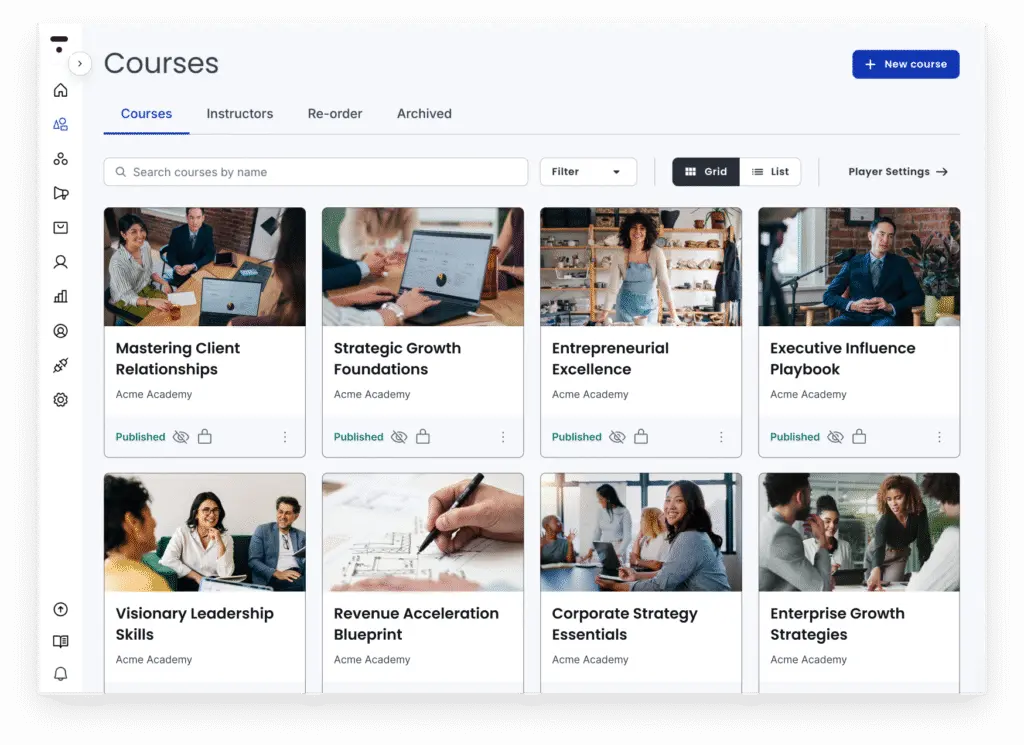
Thinkific’s course builder is a strength. You work with sections (e.g. “Week 1”, “Week 2”) and lessons inside each section. Each lesson can be video, text, PDF, quiz, or assignment. Drag to reorder; set drip by date or by “after previous lesson completed.” We built a 12-week program with weekly video lessons and PDFs; the structure was clear and easy to adjust. There’s no interactive video (no clickable hotspots or in-video quizzes); that’s the main differentiator of LearnWorlds. For standard video-based programs, Thinkific’s builder is among the best we’ve used.
If you need more detail on plans, see our Thinkific pricing for fitness coaches breakdown.
Drip Content
Drip scheduling is built in and flexible. You can release lessons by calendar date (e.g. “Week 2 available on March 1”) or by completion (e.g. “Week 2 available 7 days after enrollment” or “after Week 1 is completed”). We used completion-based drip for our 12-week program so clients could start any time and still get week-by-week structure. No coding; everything is in the lesson settings. This is essential for multi-week fitness programs and Thinkific does it well.
Memberships and Bundles
On the Start plan (Non trouvé / à vérifier) and above you get membership products and bundles. Memberships support recurring billing (monthly or annual); you can drip content by membership tier and combine courses into one product. Bundles let you sell multiple courses or products together. For a fitness membership (e.g. monthly access to a workout library and nutrition guides), Thinkific handles it. You can also sell a one-time program and a membership from the same site. Basic (Non trouvé / à vérifier) gives unlimited courses and drip but not the membership product type, so if you need true recurring membership, you need Start or higher.
Community
Thinkific includes built-in community on paid plans. You create “spaces” (discussion areas) and can attach them to specific courses or memberships. Members post, reply, and see threads in a familiar forum-style layout. We ran a test group alongside a 4-week program; engagement was higher when everything lived in one login (course + discussions) instead of “course here, Facebook there.” It’s not as full-featured as Circle or a dedicated community platform, but for accountability, progress check-ins, and support, it’s enough for most fitness coaches and avoids another $30–50/month subscription.
Quizzes and Assignments
Quizzes (multiple choice, true/false) and assignments (upload or text response) are available on paid plans. You can use them for check-ins, knowledge checks, or form submissions. We added a short quiz at the end of each week in our test program; grading was manual but setup was simple. Certificates are available on Start and Grow if you want to award completion. Nothing revolutionary, but solid for program structure.
Analytics
Thinkific’s analytics cover enrollments, revenue, completion rates, and (on higher plans) engagement by section. We found what we needed quickly: how many people started, how many finished, and where drop-off happened. It’s clearer than some competitors for “how is this program performing?” If you need full funnel and email analytics, you’d look at Kajabi or your email tool; for course and membership performance, Thinkific is sufficient.
Pricing in Practice
Thinkific has four tiers: Free, Basic (Non trouvé / à vérifier), Start (Non trouvé / à vérifier), and Grow (Non trouvé / à vérifier). Annual billing saves roughly 20–25%. Key for fitness coaches:
- Free: One course, unlimited students, no custom domain, no drip, no community. Usable to validate an offer; we used it for our first test.
- Basic ($49/mo): Unlimited courses, custom domain, drip, coupons, no transaction fees. No membership product type, no full community, no app.
- Start ($99/mo): Everything in Basic plus memberships, bundles, full community, assignments, certificates. No branded app.
- Grow ($199/mo): Everything in Start plus branded mobile app, API, priority support.
For most coaches, Basic is the sweet spot until you need memberships or community; then Start. Grow is for those who want the app or API. Our full Thinkific pricing for fitness coaches article breaks down each plan and when to upgrade.
Transaction fees: Zero on every paid plan. You pay only payment processing (Stripe, PayPal). That’s a real advantage: on $2,000/month in sales, Thinkific keeps $0 in platform fees; a platform with 5% would take $100/month.
Pros and Cons
Pros
- Free plan. Launch a real course and take payments with no monthly fee. We validated a 4-week program on the free plan in under an hour.
- No transaction fees on paid plans. More of every sale stays with you. On a $197 program × 10 students/month, that’s meaningful over a year.
- Flexible course builder. Drag-and-drop, clear drip logic, good for video programs and multi-week formats.
- Built-in community. One less tool; clients stay in one place for course and discussion.
- Drip scheduling. By date or completion; standard for week-by-week programs.
- Clear analytics. Enrollment, completion, revenue; easy to act on.
Cons
- No interactive video. No in-video quizzes or clickable hotspots. For form cues and checkpoints inside video, LearnWorlds is the option.
- Email marketing is basic. For sequences and automation you’ll use ConvertKit, Mailchimp, or similar. Not a deal-breaker but extra setup.
- Branded app only on Grow. Free, Basic, and Start don’t include the native app; clients use the browser on mobile. We tested on phone and it worked fine, but an app can feel more polished to some clients.
- Community is good, not best-in-class. Enough for most fitness use cases; heavy community-focused brands might outgrow it later.
Who Thinkific Is Best For
Thinkific is best for fitness coaches who:
- Want to start free or low-cost and scale up as revenue grows.
- Sell programs (one-time or recurring) and/or memberships with video and drip.
- Care about keeping fees low (no transaction fees on paid plans).
- Want community in the same platform as the course without adding Circle or Facebook.
- Are fine using a separate email tool (ConvertKit, Mailchimp) for sequences and marketing.
It’s a weaker fit if you need interactive video (clickable cues, in-video quizzes), a branded app on a budget (Thinkific’s app is Non trouvé / à vérifier), or a single platform that does email and funnels as well as courses (then Kajabi or Teachable may fit better). For a detailed comparison, see Thinkific vs Teachable and Kajabi vs Thinkific.
Final Verdict
We rate Thinkific 9.2/10 for fitness coaches. It delivers a strong course builder, zero transaction fees, built-in community, and a usable free plan. We built 4-week and 12-week programs without friction; the client experience was professional and analytics were clear. The main gaps (no interactive video, basic email, app only on the top plan) don’t outweigh the benefits for most program and membership use cases. We recommend it and suggest starting on the free plan to validate your offer, then moving to Basic or Start when you need drip, domain, or community. For plan details and cost scenarios, read our Thinkific pricing for fitness coaches guide.
Frequently Asked Questions
Related Articles



Free: The LMS Decision Checklist
7 Questions That Reveal Your Perfect Platform
Answer 7 quick questions and know exactly which platform fits your coaching style, budget, and goals.
We respect your privacy. Unsubscribe anytime.