Teachable vs LearnWorlds for Fitness Coaches (2026)




Teachable vs LearnWorlds for Fitness Coaches (2026)

Head-to-Head
This article uses affiliate links. We earn a small commission if you sign up, at zero extra cost to you. This never influences our ratings.
TL;DR: Quick Verdict
| Feature | Teachable | LearnWorlds |
|---|---|---|
| Best for | Conversion, built-in email | Interactive video, branded app at $99/mo |
| Starting price | $0 (Free), then $59 Basic | $29/mo (Starter) |
| Transaction / per-sale fees | 5% on Basic; $0 on Pro | $5/sale on Starter; $0 on Pro Trainer |
| Course builder | Simpler, good for getting started | Template-driven, steeper curve |
| Interactive video | No | Yes (standout) |
| Email marketing | Built-in | Basic; use integrations |
| Mobile app | iOS app, all plans | Branded app on Pro Trainer ($99/mo) |
| Community | Not included | Built-in |
| Our rating | 8.3/10 (see our Teachable review) | 8.8/10 (see our LearnWorlds review) |
Verdict: Teachable wins on conversion and email; LearnWorlds wins on interactive video and a lower-cost branded app. Neither has a free plan as strong as Thinkific’s, and both have fee considerations (Teachable’s 7.5% on Starter, LearnWorlds’ $5/sale on Starter). We tested both with real programs; the right choice depends on whether you prioritize conversion and email (Teachable) or interactive video and app (LearnWorlds). For zero fees and community, see our Thinkific vs Teachable and LearnWorlds vs Thinkific comparisons.
Who This Comparison Is For
You’re a fitness coach choosing between Teachable and LearnWorlds. You want a straight comparison: features, fees, and which platform fits your teaching style and budget. We built programs on both, set up payments and drip, and compared conversion tools (Teachable) vs interactive video and app (LearnWorlds). This article gives you the verdict by section so you can decide. If you’re also considering Thinkific, our Thinkific vs Teachable and LearnWorlds vs Thinkific articles fill in the rest of the picture.
Overview: Two Different Strengths
Teachable is built for conversion and marketing. Strong sales pages, checkout flow, order bumps, and built-in email (sequences, broadcasts, automation). It has a free plan and a native iOS app for students on all plans. The tradeoff: 7.5% transaction fee on the Starter plan ($59/mo); you need Pro ($159/mo) to remove it. No built-in community; you’d add Circle or a Facebook Group. We’ve reviewed it in depth in our Teachable review for fitness coaches.
LearnWorlds is built for teaching and brand. It’s the only major LMS we’ve tested with native interactive video: clickable hotspots, in-video quizzes, overlay text, and bookmarkable timestamps. It also offers a branded mobile app on the Pro Trainer plan (Non trouvé / à vérifier), half of Thinkific’s app tier. It has built-in community. The tradeoffs: no free plan, $5 per sale on the Starter plan, and a steeper learning curve. We’ve reviewed it in our LearnWorlds review for personal trainers.
We ran the same 4-week program on both. Teachable had us from signup to “sales page + welcome sequence + first enrollment” in about 70 minutes. LearnWorlds had us from signup to “interactive form tutorial + 4-week program with drip” in about 90 minutes. Different strengths: Teachable for getting people to buy and stay in the loop via email; LearnWorlds for how they learn (interactive video) and how they access (branded app). Below we break it down by feature and cost.
Feature-by-Feature Comparison
Interactive Video
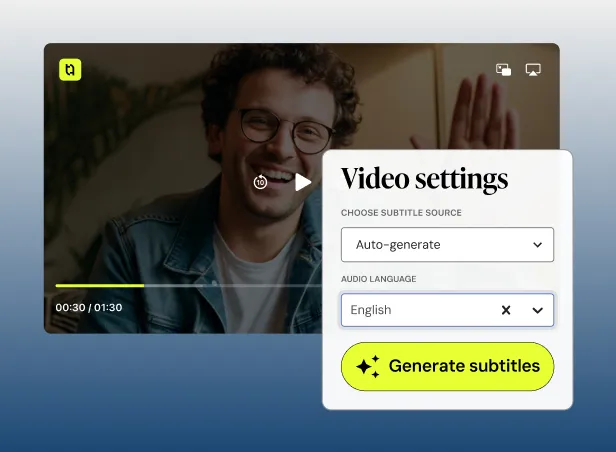
Winner: LearnWorlds. LearnWorlds is the only one of the two with interactive video. You can add clickable elements, in-video quizzes, overlay text at specific seconds, and bookmarks. We used it for a form tutorial: hotspots on common mistakes, a 2-question checkpoint mid-video, and cues at the right moment. Teachable has standard video: upload, play, optional quiz after the lesson. No in-video interactivity, though it does offer AI-powered automatic subtitles to improve accessibility.
For technique, form cues, and progressions, LearnWorlds is the only option in this matchup. For straightforward video lessons, Teachable is fine.
Course Builder
Winner: Teachable (ease) / LearnWorlds (power for interactive). Teachable’s builder is simpler to learn: sections, lessons, add content, set drip. We had a 4-week structure with drip in about 45 minutes. LearnWorlds is more template-driven and took longer to work through the first time, but it supports interactive video and more layout options. For “video + PDF + drip” only, Teachable is faster. For interactive elements and denser instruction, LearnWorlds’ builder supports that better. See our LearnWorlds vs Thinkific for how LearnWorlds compares to Thinkific’s drag-and-drop.
Marketing and Email
Winner: Teachable. Teachable has built-in email: sequences, broadcasts, and basic automation. We set up a 5-email welcome sequence in about 20 minutes; triggers (e.g. “purchased product X”) were clear. LearnWorlds has basic email and integrations (ConvertKit, etc.) but not the same depth. If you want one platform for course and email, Teachable wins. If you’re already on ConvertKit or Mailchimp, LearnWorlds is workable. For conversion-focused coaches, Teachable has the edge.
Sales Pages and Checkout
Winner: Teachable. Teachable is built for conversion: sales page builder, checkout optimization, order bumps, one-click upsells. We added an order bump and had a polished checkout in a few clicks. LearnWorlds has sales pages and checkout; they’re professional but less conversion-focused out of the box. For “visitors don’t buy” as your main problem, Teachable wins. For “I need better teaching tools,” LearnWorlds wins.
Community
Winner: LearnWorlds. LearnWorlds has built-in community (discussions, groups). Teachable does not; you’d add Circle, a Facebook Group, or similar. For retention and accountability, having community in the same platform as the course is a plus. LearnWorlds gives you that without an extra subscription; Teachable doesn’t. Thinkific also has community and zero fees; see our Thinkific vs Teachable if community and cost are top priorities.
Mobile App
Winner: Depends. Teachable has a native iOS app for students on all plans; it’s not white-label but gives clients a dedicated app. LearnWorlds offers a branded app (your name and logo) on Pro Trainer (Non trouvé / à vérifier). So: app on every plan = Teachable; branded app at lower cost than Thinkific’s Non trouvé / à vérifier tier = LearnWorlds. Both deliver mobile access; LearnWorlds wins if you want your brand on the app.
Pricing and Fees
Scenario at 10 sales/month, $197 each: Teachable Starter: $59 + 7.5% ($98.50) = $157.50. LearnWorlds Starter: $29 + $5×10 = $79. LearnWorlds is cheaper here. At 20 sales/month: Teachable Starter: $59 + $197 = $256. LearnWorlds Starter: $29 + $100 = $129. LearnWorlds still cheaper. LearnWorlds Pro Trainer: Non trouvé / à vérifier, no per-sale fee = Non trouvé / à vérifier total. So at 20 sales, LearnWorlds Pro Trainer (Non trouvé / à vérifier) undercuts Teachable Starter ($256) and is cheaper than Teachable Pro ($159). Thinkific Starter (Non trouvé / à vérifier, zero fees) would be Non trouvé / à vérifier at any of these volumes. See our best LMS for fitness coaches for more scenarios.
Real Testing: What We Built on Each
Teachable: We created an account, built a 4-week program with weekly drip, set up a sales page and checkout, and added a 5-email welcome sequence. Time to “first enrollment with drip and email live”: about 70 minutes. The conversion-focused pieces (sales page, order bump, email) were the fastest part. Course structure was straightforward. No interactive video; we had a quiz after a lesson but not inside the video.
LearnWorlds: We created an account (Pro Trainer to avoid per-sale fees), built a 20-minute form tutorial with hotspots and in-video checkpoints, and a 4-week program with drip. Time to “tutorial and program live”: about 90 minutes. The interactive video took the most time (45 min first time); the 4-week program was comparable to Teachable once we learned the builder. Community and app were available; we didn’t set up email sequences (we’d use ConvertKit).
Verdict: Teachable is better when your bottleneck is “get people to buy and follow up with email.” LearnWorlds is better when your bottleneck is “teach better with interactive video” or “give clients a branded app without paying Non trouvé / à vérifier.” For cost and community, Thinkific is still worth comparing. Thinkific vs Teachable and LearnWorlds vs Thinkific.
Pros and Cons
Teachable
Pros: Strong sales pages and checkout; built-in email; iOS app on all plans; free plan; coaching product type for 1-on-1. Cons: 5% transaction fee on Basic; no built-in community; less flexible course builder than Thinkific; no interactive video.
LearnWorlds
Pros: Interactive video (unique in this comparison); branded app at $99/mo; built-in community; strong site builder; no per-sale fee on Pro Trainer. Cons: No free plan; $5/sale on Starter; steeper learning curve; email marketing basic (use integrations).
Who Each Is Best For
Choose Teachable if your main challenge is conversion and you want sales pages, checkout, and email in one place. Also choose Teachable if you want a student app on every plan and don’t need interactive video or a white-label app. Best for coaches who drive traffic and want to minimize tool sprawl, and who accept the 7.5% fee on Starter or the cost of Pro.
Choose LearnWorlds if interactive video (form cues, in-video quizzes) or a branded app at $99/month is a priority. Also choose LearnWorlds if you want built-in community and are okay with no free plan and a steeper setup. Best for premium or video-first coaches who teach technique and progressions.
Consider Thinkific if you want a free plan, zero transaction fees, and built-in community. See our Thinkific vs Teachable and LearnWorlds vs Thinkific for that angle.
Final Verdict
We rate this comparison 8.5/10. Teachable and LearnWorlds are both solid; they excel in different areas. Teachable wins on conversion and email; LearnWorlds wins on interactive video and a lower-cost branded app. Your priority (getting more sales and email in one place vs. teaching with interactive video and having a branded app) decides. For many fitness coaches, Thinkific remains the best balance of cost, features, and community. Use our best LMS for fitness coaches, Teachable review, and LearnWorlds review to see the full set.
Frequently Asked Questions
Related Articles

Free: The LMS Decision Checklist
7 Questions That Reveal Your Perfect Platform
Answer 7 quick questions and know exactly which platform fits your coaching style, budget, and goals.
We respect your privacy. Unsubscribe anytime.